May 27, 2007

Microsoft e-learning free sample


For a limited time you can get free access to a Microsoft E-learning course on ASP.NET. Even if ASP.NET is not your cup of tea or sounds like a disease, it is worthwhile to have a look. You will need a Windows Live ID to register. One of the nice things is an automatic scanner to check if your system meets your prerequisites as seen in figure 1. But the course player itself gave me a WOW feeling. Of course there is the tree-like menu structure that hold all the SCO modules in the course. But inside a module there is a very nice visual navigator too with introduction, a suite of learning activities such as video, animation, instruction, etc that you can take in any order, and a self test at the end. There is also an integrated Notes panel in the same screen. And the top of the screen has a search function that will search the entire course. I really feel in control as a learner when I take such a course, and that's exactly the point. At all time I know where I am, and I can search and select the activity I take next.
My recommendation: give it a try, just for the experience.

May 21, 2007

SkillSoft completes acquisition of NETg

I received a nice e-mail from my NETg contact that the SkillSoft acquisition of NETg (for about 270m$) has been completed.

Now there is only one big worldwide player for off-the-shelve content left, next to an enormeous amount of little local players.

The goal of course is to streamline the offer and make sure SkillSoft courses run on the NETg platforms and vice versa. That should be done somewhere in 2008. The long term goal is to come up with a unified platform.

May 16, 2007

Moodle installation (my try)

In this article I will share my experience with installing and configuring the most popular open source Learning Management System (LMS): Moodle. This article is not intended to be an installation manual, because you can find those on the Moodle site. It is written as a 'learning journey' and reflects the steps I have taken, the problems I encountered and how I (didn't) solve them. The article will show I'm no genius :-) but I think this kind of 'learning journey' description might be more useful for people than traditional step-by-step instructions. In a world where everything changes so rapidly it is more important to find your way than to have a very detailled but also very specific step-by-step guide. It is more important to tell about potential problems and where to look for help than to discuss a problem free installation. There is no such thing as a 'installs problem free in 5 minutes' software, at least not if you have a free choice in many platforms, databases, and other underlying technologies and middlewares.

So let us start at the beginnings.
1- Download of the Moodle code. Initially I downloaded version 1.8 because that is the latest stable release. Go to http://download.moodle.org/ and download the zip package. I also downloaded extra modules (the scorm module) and extra language packs (Dutch and French), but later I found out that you don't need that. The SCORM module is included by default and the language packs can be downloaded and installed automatically via the Moodle administration interface.
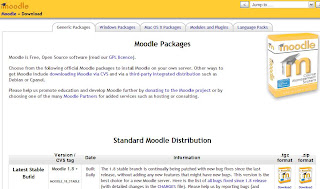


2- Unzipped the package somewhere on my hard disk. The zip file is about 12 MB, the unzipped folder about 35 MB.
3- I also printed out the manual at http://docs.moodle.org/en/Installing_Moodle
4- Then I needed to copy the contents of the unzipped package to my web server. Moodle is a PHP application and uses MySQL as a database. As I use a web host (ipowerweb), I needed to transfer via FTP. I created a folder 'moodle' and transferred all the files. That took quite some time. (15-20 minutes) In case you want to know, I use the free FileZilla FTP client.
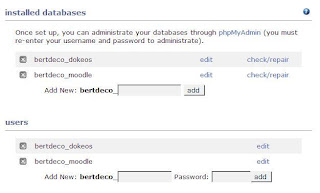
5- Before you can start the installation script, the database must exist. So I created a new MySQL database and a new MySQL database user account for the Moodle program. With my web hosting provider I can do that via the control panel web interface. Other providers will have similar tools. If it is a local server you can use the popular PhpMyAdmin tool.


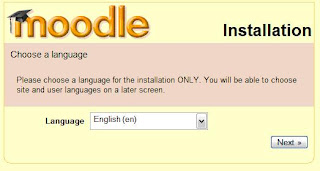
6- Start of the installation program. Very easy, just opened my browser and went to the URL of where I copied the moodle code. The installation program will automatically start. If that doesn't work somehow, go to 'install.php' in the root. First step is to select the language for installation. This doesn't affect Moodle itself, it's just the language shown during the installation.


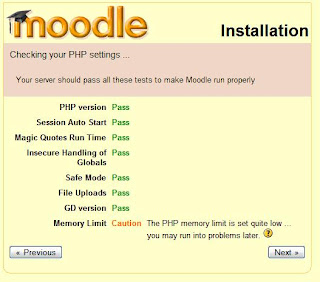
7- Next screen is important as it checks for prerequisites such as PHP settings. If any is not OK you will be warned and you have a help section on how to resolve them. For some settings you cannot continue with the installation until the prerequisites are met. In my case the memory limit was too low. If you have full acess to the server you can change settings in your PHP.ini config file. On a hosting provider, you may not have access to that, as in my case. But then you might be able to create a file called .htaccess (no name, just .htaccess as file name) with commands in likephp_value memory_limit 16M. More info on: http://www.javascriptkit.com/howto/htaccess.shtml


8- Next I needed to provide the locations of the moodle folder and the moodle data folder. They are prefilled for you but make sure the Data Directory folder points to an existing folder. In that folder Moodle will store uploaded files and it is recommended to put that folder outside of the moodle main folder. If it is not, you can still continue with the installation but you will get an error message "fopen ... failed to open stream moodledata" on top of each screen as I found out later. They really want you to put that folder elsewere :-).
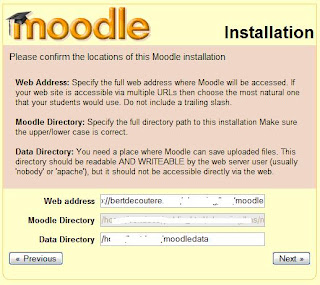


9- Next screen is for the database configuration. Filled in the host server name (type 'localhost' if it is the same as the web server), the database name and database user configured in step 5. If you want the installation script can add a prefix to all table names. (In case you want to reuse an existing database and want to avoid name clashes. I have 5 MySQL databases in my hosting package so I didn't need to share with another application. For production servers that would not be a good idea either.)

10- Son of a biscuit! I'm blocked at the next screen that again checks for prerequisites but this time on the level of the database. Turns out I need a higher version than the MySQL that comes with the ipowerweb package. So IF you can find the version of MySQL and PHP supported by your hosting provider, check them before you start your installation :-) . (It's called 'Read the F****** Manual', but who does?)
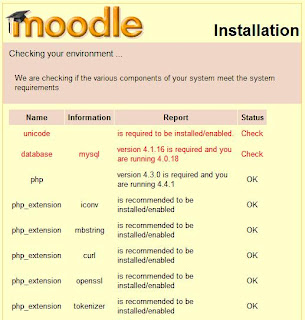


So I started the whole thing over on my other hosting provider, seekdotnet. This time I succeeded because they do support PHP and MySQL versions that are high enough to meet the demands of Moodle.

11- Next screen asked me about installing language packs. There is time to do that later once installed, so I just pressed Next.

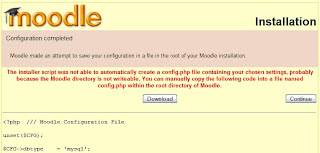
12- The final screen tries to write all those changes to a config file in your moodle installation directory. If your site is even a bit secured, that will not work, and you'll get an error saying you need to manually copy the content shown on the screen to a file config.php in the Moodle directory. So I copied the text, created the config.php file and pasted it in and pressed Continue.


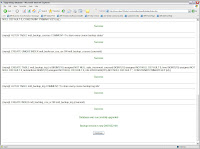
13- Next, the database creation scripts run. Don't be like me and refresh the browser when it takes some time. You'll have 5 or 6 pages with database scripts that run, and wait untill you see a button 'Continue' at the bottom of the page. It is the same kind of screens you'll see after updating the moodle installation. I had better experience doing this in Internet Explorer than in Firefox where the continue button didn't work.


14- Next screen you need to fill in the administrative details of the site such as the name.
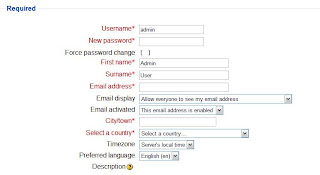


15- Next I installed language packs to make it a multilingual learning portal. Go to menu on the left, choose languages, install language pack. Point to them, they are downloaded and installed automatically. It's that simple.

Done.

My conclusion:
Moodle installs quite easily, but you need to check your environment meets all requirements. If you get stuck the forums or other web sites will probably have a solution and help you out. The Moodle community is hugh, so the chances you are the only one with a particular problem are really slim.

May 10, 2007

CLO Business Intelligence Report 2007 available

Chief Learning Officer magazine has published its 2007 CLO Business Intelligence Industry Report, based on a survey among almost 2000 professionals in the Business Intelligence Board. The executive summary is available for free at their web site, the full report is paying.

Some numbers out of the summary I stumbled upon:

  • There is more spending for learning and development. The increase averages 10-15%. The strongest spending growth is among small companies. Spending goes a.o. to leadership development and learning technologies.
  • Classroom is the major delivery format, but its share decreases a bit and that of elearning increases a bit.
  • Only 20% of companies track informal learning and only 8% have a strategy for it. More than half of companies expect to increase support for informal learning.
  • Talent Management is on the rise.
  • Learning functions look at their staffing, most are understaffed. Also outsourcing rises slighlty.
  • In general, CLOs are more optimistic than a year ago.

May 6, 2007

LMS on the cheap: open source learning systems

Please refer to my post in my other blog: about2findout.com/blog

http://www.about2findout.com/blog/2007/05/lms-on-cheap-open-source-learning.html

I'm going to have a look at Moodle, Dokeos and the Sharepoint Learning Kit in the next articles and see how they would do as a basic e-learning delivery system for corporations.

May 4, 2007

Open source LMS Dokeos 1.8 released

Yesterday the Dokeos company and community released the newest version of its open source and free LMS with the same name.
In the world of open source LMS systems, Moodle claims the top spot in the number of downloads and the size of its community. But Moodle is not alone, there are SAKAI, ILIAS, ATutor, etc ... and also Dokeos.

Dokeos is a PHP-based LMS that runs on a typical LAMP or WAMP stack (Linux or Windows, Apache web server, MySQL database and PHP). It is a fork of the Claroline LMS and a Belgian open source project, used among others at the university of Ghent. The Dokeos company not only contributes to the open source community, but also provides commercial services such as training, support, installation services and the like.

The newest version is 1.8 and it is a major update. Dokeos is not only an LMS anymore, but includes now a rapid authoring tool Oogie and videoconferencing for virtual classrooms. The major improvements are
  • better SCORM support (export of a learning activity to SCORM, import SCORM, tracking)
  • video conferencing system
  • Oogie: powerpoint to course convertor, includes possibility to record your voice with each slide via the browser
  • better reports
If you just want the basic LMS part, the installation and requirements are not that different: Php, MySQL. However it gets more tricky for the new parts as Oogie and web conferencing, that involves Open Office, Tomcat, Java and a much more complex setup. You will probably not be able to get those working on a regular hosting provider.

A few years ago I evaluated open source LMS systems for use as an e-learning delivery system in enterprises, and I deemed them not ready. Soon I'll start evaluating Moodle and Dokeos again and see how enterprise-ready the systems have become. I'll keep you posted. If you already want to play around with Dokeos, download it from www.dokeos.com or play with it on the free campus.

May 3, 2007

e-learning in Africa

At the end of this month the second e-learning africa conference will be hosted in Nairobi, Kenya.
Back in my student days I was part of a the multitaal project to create language training cd-roms for the many national languages in South Africa. Many people think of Africa as a 'back' region, also in terms of learning and e-learning. But in fact, I think the lower penetration of the internet and the much lower number of computers per inhabitant might bring the most advanced m-learning projects to Africa. Mobile phones are about the only widely available and relatively cheap communication devices in the region, so it makes sense to create e-learing for mobile phones rather than for computers. We have been talking so much about m-learning, but I still need to see massive use of it. Mostly it is a secondary and lower quality distribution of a web-based course. Will Africa teach us how to bring m-learning further?

Apr 26, 2007

Clips of learning (2)


Another clipping (I think it comes from CLO Magazine but I am not sure):

The future of learning will stretch beyond the walls of our own organisation into the 'extended enterprise'. We will educate our customers, our partners, our suppliers. That is not news. The graph illustrate how far we are with these 4 different kind of audiences. Far most is of course for our own employees. Then customers. Partner and supplier education are quite low.

Apr 25, 2007

Statistics: How long does it take to create e-learning?

I'm often asked for development ratio's and other statistics on e-learning development. A characteristics of e-learning is that is requires more time and money upfront to develop the course as compared to more traditional approaches. Some people don't realise that so it is good to set the expectations right from the beginning.
The text and table below come from a free Brandon Hall research paper 'e-learning 101' that I wrote about in a previous post. You'll find industry-average numbers that should give you a rough idea.
- - -
How Long Does it Take to Create E-Learning?
There are no set measurements on how long it takes to create e-learning. It depends on the content, resources available, level of interactivity, and capabilities of the developer. One source says creating a one-hour e-learning course averages about 250 hours of development time.
Acceptable production times are approximately 8-12 weeks for one hour of training, 12-16 weeks for two hours of training, and 16-20 weeks for three hours of training (Codone, p.14). This is consistent with this author’s experience on an interactive course utilizing a team of people. Bryan Chapman, chief learning strategist and consultant/researcher through alliance with Brandon Hall Research, provides the following benchmarks

Ratio

Type of learning

34:1

Instructor-led training (ILT), including design, lesson plans, handouts, PowerPoint slides, etc.

33:1

PowerPoint to e-learning conversion. Not sure why it takes less time then creating ILT, but that’s what we discovered when surveying 200 companies about this practice.

220:1

Standard e-learning, which includes presentation, audio, some video, test questions,and 20 percent interactivity

345:1

Time it takes for online learning publishers to design, create, test, and package thirdparty courseware

750:1

Simulations from scratch. Creating highly interactive content.

SAP and Adobe join forces for SAP Enterprise Learning

Giants Adobe and SAP will work together on a new product called SAP Enterprise Learning. It is due in the 3th quarter. SAP will also start reselling the Adobe Connect (formerly called Breezer I believe) products. SAP already is reseller for the RWD Infopak simulation authoring tool.

With this move once again a major ERP player is positioning itself further in the enterprise learning market. It makes sense and we all knew this was coming. After all, learning is being freed from its silo and increasingly integrated into the (HR) processes of a company. So far SAP has not been very succesful in persuading organisations to move to its LMS solution because it is perceived by the market as 'not good enough yet'. That might change when SAP seeks more and more partnerships with established players in the field. After all, there are enormeous benefits in buying one big package from your ERP vendor that includes learning out of the box and is integrated with existing databases.

It is an interesting move and the future will tell if the future for learning systems will be for the big ERP players such as Oracle or SAP, or stay within the hands of established players such as Saba, SumTotal etc who themselves are moving towards the more general HR field.

Apr 24, 2007

What is your ideal blend?

According to statistics from ASTD instructor-led training (ILT) dropped from 80% in 1999 to about 61-68% in 2005. The use of e-learning rose from about 8% in 1999 to 28-38% in 2005. So roughly speaking the blend of ILT versus e-learning in the learning offering mix went from 80/20 to about 70/30 in five years time.

This shift will continue for some more time, but eventually stabilize. So maybe it is time to think about what would be the ideal blend for your organisation?

I know for example here at IBM we are about 50-50 and want to keep it that way. There are no plans to increase the level of e-learning delivered education because we think we are at the right mix for our company, content type, cost and audience.

Apr 23, 2007

Free report 'e-learning 101' by Brandon Hall

Brandon Hall research gives away this free 57 page introduction e-book to e-learning, e-learning tools and technologies. (Click on the picture to download.)

Fields such as e-learning tend to confuse people with the technical details, the for-insiders-only language and vast list of acronyms. This report will bring everyone up to a basic level of understanding and make sure everyone can talk intelligently about e-learning.

It talks about the history of the profession and technology, the/a definition of e-learning, instructional design, development roles, evaluation and authoring tools. It comes complete with illustrations, references to actual products or vendors, a much needed glossary for beginners and FAQ.

For experienced learning professionals this guide will bring few or no new information, but it is nice to have it all available in one easy guide. For newcomers to the field this guide will quickly get you up to speed.

One short paragraph I like very much is the one on pro/cons of e-learning. It summarizes it nicely.

There are advantages and disadvantages associated with e-learning. Advantages include cost, geographical reach, use of multimedia, availability, portability, consistency, learner control, up-to-date content, no duplication, and shorter learning time. Disadvantages include a lower level of interactivity, initial development time and cost, technological limitations (bandwidth, access), developer limitations, learner motivation, learning styles, and preferences.

Apr 19, 2007

More e-learning in big companies, less in SME

A NIDAP study in the Netherlands reveals that in 2006 total training spendings increased, as predicted. E-learning grew in large companies, but actually reduced in smaller companies.
That's also the feeling I have. SME rely more on informal or classroom training. If they use e-learning it tends to be provided to them for free or at low cost by government bodies that try to stimulate the economy.

Apr 13, 2007

Toolbox of 20 instructional models

There is a free download from Blinc productions entitled 'Instructional Models in eLearning and Blended Learning' available from this link.

The report builds on the 'Goettinger Katalog Didaktischer Modelle', that goes back to the mid-seventies. It lists 20 instructional models with definition, didactic principles, reference to eLearning and a template for designing them.

The 20 models are:
- activity method, assignment method
- disputation
- exploration, excursion
- case method
- apprenticeship, assistance
- distance study, correspondance instruction
- classroom teaching, expository teaching
- programmed instruction, personalised instruction
- individualised learning center, laboratory plan
- micro-study circle, small group discussion
- educational/learning exhibition
- educational dialog
- clarifying educational environment, interactive man-environment learning system approach
- educational conference, symposium
- educational network
- learning project
- simulation
- peer tutoring
- lecture method
- educational workshop

Apr 11, 2007

Outsource the learning function

More and more companies are considering outsourcing (part of) the learning function. So maybe it is not a question of 'if' but 'when'... In any case you should always keep the learning strategy in your own hands and that of your Chief Learning Officer, who's job it is to assure alignment of the learning function with the business.

On the website trainingoutsourcing.com there are many links and articles on the topic. For example the Training Process Framework. It lists processes that are typically found in the learning function in 3 categories: administration, content and delivery.

LMS getting cheaper


In a recent Brandon Hall newsflash, Richard Nantel compares prices of LMS systems over time. He concludes prices have dropped since 2005 for small, medium and enterprise wide installations, and equally for installed or hosted systems. (hosted solutions are more expensive than internally installed systems)

Apr 10, 2007

Survey: more e-learning

Novation Group did a survey among +2000 HR professionals. They report that they are under pressure to reduce the time-away of the employee and increase the bottom line accountability of learning. No surprises there, these are trends we see for some time now.

Here are some trends on the rise:
  • More online/e-learning: 57 percent
  • Greater effort to quantify results of training/development: 42 percent
  • Increased on-the-job training: 41 percent
  • Personal coaching: 35 percent
  • Fewer classroom hours/more condensed classroom time: 30 percent
  • Outsourcing of trainers/facilitation resources: 25 percent
  • More podcasting: 10 percent
I note that blending education with forms of e-learning is rising (as predicted), the ROI focus is getting stronger (as predicted), and learning is more embedded on the job rather than an island on its own (as predicted). I'm surprised at the strong trend for outsourcing (25%). But it is on a lot of agenda's so I guess we'll see a lot of that happening in the years to come.

But stay real people, because classroom training isn't going anywhere. It still holds a strong unquestionable first position.

  • Classroom training (instructor-led): 87 percent
  • On-the-job (OTJ) training: 79 percent
  • Seminars/webinars: 78 percent
  • Coaching/mentoring: 66 percent
  • e-learning/self-paced study: 64 percent
  • University programs: 33 percent
  • Simulations: 22 percent

Mar 25, 2007

Clips of learning (3) - ISO reference process

The last clipping I find worth sharing is one on the ISO reference process for the development of a new e-learning program.

Mar 23, 2007

Clips of learning (1)

I often copy some pages from magazines or other sources of information to read later. After some time when the pile on my desk becomes too high, I start going through them. The samples below come from some of the clippings I find interesting. However, I have forgotten where I got them from, so please forgive me if I cannot recall the source.

For the first clip, the source is luckily still included. It is a categorisation of 4 quality preference profiles: individualist, result-oriented, pragmatic and avant-gardist. Not everyone finds every aspect of the learning activities spectrum as appealing. (click on the picture to enlarge)


The second clipping comes from a survey amongst learning professionals and lists the learning roles most in demand. Instructors and instructional designers are on the top of the list. Our industry is expecting a revival because of the war on talent that is emerging (and in some sectors it is already war time). But so far the learning industry doesn't expect this war of talent to affect herself... I think we might also see a fight over scare learning profiles in the years to come.

Mar 22, 2007

Learning Dashboards

Companies want to be able to manage the learning function just as any other function or business. Therefore, CLOs need relevant data to base their decisions on. One way is to construct a learning dashboard.
According to Jeffrey Berk in a recent article (Designing and Delivering Learning Analytics Dashboards), there should be 4 categories of data available in such a dashboard: operational, financial, performance, cultural.

  • Operational
    • Number of students trained / training hours performed
    • Usage rates of instructors, e-learning
    • Average class size
    • Completion and cancellation rates
  • Financial
    • Cost per student day
    • Learning as a percentage of payroll
    • Development budget
    • Productivity and ROI
  • Performance
    • Satisfaction (level 1)
    • Test scores
    • Time-to-competence
  • Cultural
    • Average hours per employee
    • Management support